Connecting Drives in Windows
- Establish a VPN connection
(Instructions for VPN here ▶ https://zammad.hnee.de/#knowledge_base/1/locale/de-de/answer/9)
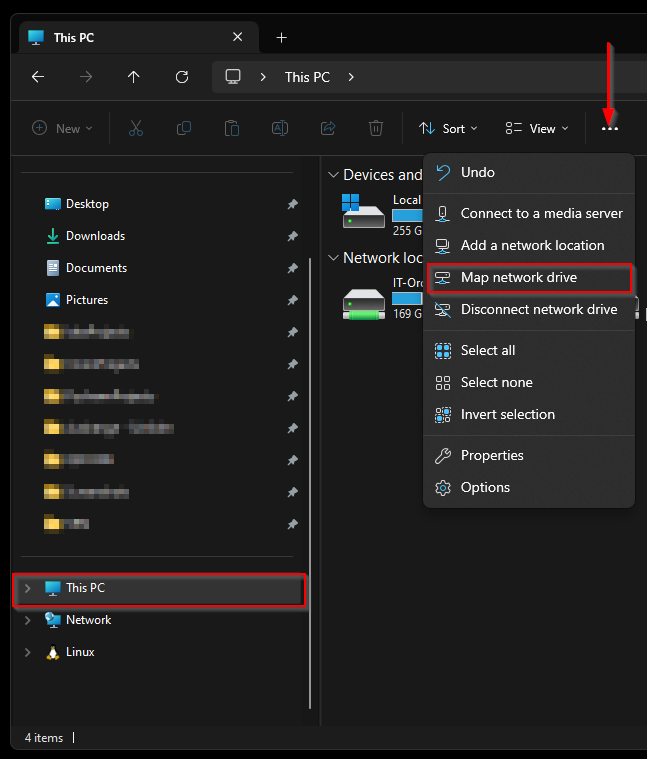
- Open “This PC” in your file explorer.
- Select the “Computer” tab and then “add network drive”.
- Now select P or S under Drive.
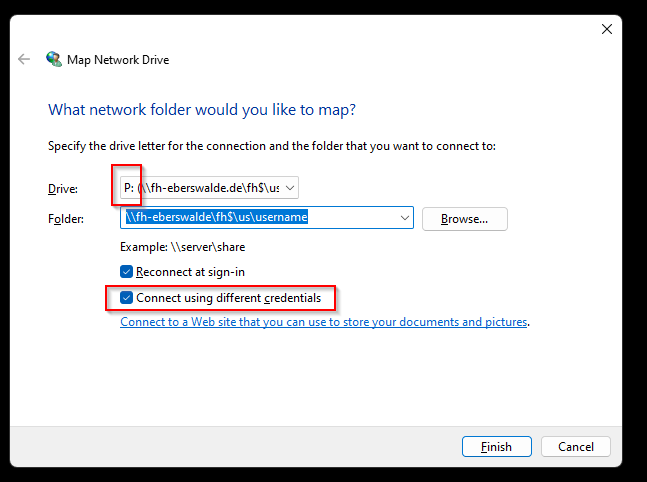
For the P drive, enter the following under “Folder”:
As a employee | student from the city campus:
• \\fh-eberswalde.de\fh$\us\YourUsername
As a employee |
student from forest campus:
• \\fh-eberswalde.de\fh$\uw\YourUsername
For the S drive:
\\fh-eberswalde.de\frei
“YourUsername” is your Windows login name within the HNE. (e.g. u12345 or abc123)
Now check the box next to “Connect with other credentials”.
- Finally enter “fh-eberswalde\” + your HNE username (e.g. u12345 or abc123) and your corresponding HNE password.
Published: